KikiBet logo
Smartphone displaying a colorful game screen on a dark surface with lime green and deep purple neon glow accents

KikiBet App: playing from your phone for first-timers

Updated: 11 November 2026

KikiBet app: install in one table

DeviceInstallation stepsFile size
Android smartphoneOpen the site in your browser, tap the mobile menu, download the APK file, allow installation from this source, and tap InstallAbout 40 MB
Android tabletVisit the site via Chrome, get the KikiBet APK from the app page, approve unknown sources in settings, and run the installerAbout 40 MB
iPhoneOpen the site in Safari, tap the Share button at the bottom, select Add to Home Screen, and tap Add in the top cornerUnder 1 MB (shortcut)
iPadLoad the site in Safari, press the Share icon in the top bar, choose Add to Home Screen, and confirm the icon nameUnder 1 MB (shortcut)
Mobile browser (any OS)Open Safari or Chrome, go to the site, sign in with your email and password, and play directly without installing files0 MB

Installing the KikiBet app takes around two minutes regardless of which handset you use, though the route differs completely between Android and Apple devices. Because the Android version is an APK downloaded directly from the site rather than a store listing, you have to approve the file manually in your phone settings before it will open. Once the icon is on your screen, you get the exact same account balance, verification tools, and cashier limits as the desktop site, plus quicker access through a four-digit PIN or biometric login.

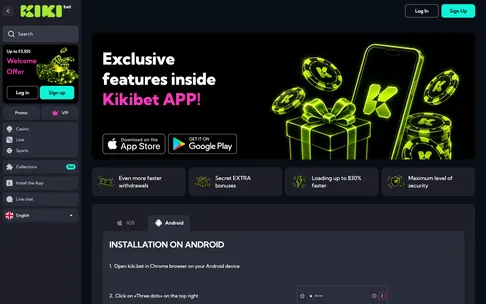
The KikiBet app page shows the download buttons and the Android installation steps; the APK is about 40 MB.

KikiBet app page with App Store and Google Play buttons and Android installation steps

KikiBet mobile: iPhone web app

If you are searching the App Store for a KikiBet download on an iPhone or iPad, you will not find a native listing there. Apple users access the KikiBet mobile casino through a progressive web app created directly from the Safari browser. If the Add to Home Screen button is missing when you look for it, you have probably opened the site in Chrome or Firefox by mistake. To fix this, copy the address into Safari, tap the square Share icon with the upward arrow at the bottom of the screen, scroll down the menu, and tap Add to Home Screen. Confirm the name to place the parrot mascot Kiki icon right next to your other apps. Opening the casino from this shortcut removes the Safari address bar, giving you a full-screen view of all 5,000+ games and the cashier. You can also save your login details in iCloud Keychain so that Face ID fills in your email and password automatically every time you launch the icon.

KikiBet app: logging in from the app

Typing a long password on a small touchscreen often leads to typos, and five wrong attempts in a row will lock your account for around 30 minutes. The KikiBet app avoids this problem by letting you set up a four-digit PIN and biometric login right after your first sign-in. Once you enter your email and password for the first time, a prompt asks you to create a quick PIN and toggle on fingerprint recognition or Face ID. If you skipped that screen during setup, open the bottom menu, go to Profile, tap Security, and switch on Biometric Login from there. For anyone who still needs to put the software onto a Samsung, Pixel, or other Google handset, our KikiBet Android app page walks through the file permissions step by step.

Sometimes biometrics stop working after you add a new fingerprint to your phone, change your screen lock, or install a system update. When the fingerprint scanner or Face ID fails three times in a row, the app automatically hides the biometric prompt and falls back to the standard email and password screen. Do not keep tapping the sensor or guessing an old password. Instead, sign in once using your normal credentials or request a password reset link (valid for around 30 minutes), then head back into Profile and Security. Turn the biometric toggle off, close the app completely, reopen it, and turn the toggle back on to resync the app with your phone’s security chip.

KikiBet app: what works in the app

You do not lose any features by switching from a laptop to your phone, which is why our editorial team scored the mobile setup 8.7 out of 10. The lobby holds the full catalogue of over 5,000 games, including slots like Big Bass Bonanza, Book of Dead, and Wanted Dead or a Wild, crash titles such as Aviator and JetX, and live tables from Evolution and Pragmatic Play Live with stakes from £0.50 to £10,000 per round. If a live stream stutters on mobile data, tap the gear icon inside the table view to lower the video quality. The sportsbook is built into the same bottom navigation bar, covering 30+ sports with Cash Out, Bet Builder, and an Acca Boost up to 50% on football. Inside the mobile Cashier, you can deposit from £10 (£20 to trigger a bonus) using Apple Pay, Google Pay, Visa or Mastercard debit cards, Skrill, Neteller, Paysafecard, bank transfer, or crypto. You can also upload your passport or ID card and proof of address in the Verification tab, track your Kiki Club levels from Egg up to Golden Kiki, and turn on push notifications so you do not miss the Friday Reload code FRIDAY for 50% up to £200 plus 50 free spins.

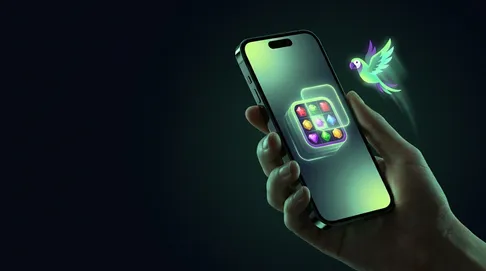
On iPhone the KikiBet web app is added through Safari: Share, then Add to Home Screen, and the icon opens the full lobby.

Hand holding iPhone adding a colorful casino game app to home screen, glowing green parrot of light, dark background with neo

KikiBet app: app vs browser

Both the installed KikiBet app and the standard mobile browser site connect to the exact same wallet, meaning your real-money balance, active x35 bonus wagering, and withdrawal limits (£2,500 a day, £7,500 a week, £25,000 a month) never change between the two. The main difference comes down to storage space, login speed, and how your phone handles background data when you switch between screens.

The Android APK takes up about 40 MB on initial download and grows to around 80 MB as it caches game thumbnails from studios like Hacksaw Gaming, Nolimit City, and Push Gaming. In exchange for that space, the lobby loads faster on a 4G connection, biometric login is built right into the launch screen, and you get push alerts when a withdrawal moves from pending (up to 24 hours) to paid, which takes up to 1 hour for Skrill, Neteller, or crypto. The browser version uses zero permanent storage and never asks you to download an update file, making it handy for older phones with full memory.

Here is a practical example of how they behave differently during a session. Suppose you deposit £20 via Apple Pay or Google Pay with code KIKI100 to get a £20 bonus (requiring £700 in wagering at x35, with a £5 max bet per spin) and start playing Gates of Olympus. If a WhatsApp call interrupts you while playing in a standard mobile browser, switching apps for five minutes often causes the browser tab to refresh, forcing you to log back in and reload the slot from the lobby. Inside the dedicated app, the session stays open in the background, so when the call ends you return straight to your spin without entering your password or waiting for a 6-digit SMS code.

KikiBet APK: fixing app problems

Because the KikiBet APK does not update automatically through Google Play, most faults on Android happen when an older file version clashes with a new lobby update, or when cached data fills up your phone. If the app crashes on the parrot splash screen, refuses to install, or shows a blank white page in the Cashier, work through these concrete fixes.

  • Problem: The APK download will not install. Your phone blocks files from outside the store by default, or you are short on memory. Open your phone Settings, go to Apps, select Special App Access, tap Install Unknown Apps, and switch the toggle on for Chrome. Also check that you have at least 150 MB of free storage so the 40 MB installer has room to unpack.
  • Problem: A message says a new version is required, or the app loops on the loading screen. You are running an outdated build. Do not just tap the old icon again. Uninstall the current app from your home screen, open your browser, visit the site to run a fresh KikiBet download of the latest 40 MB APK, and install it over the top. Your account balance and Kiki Club progress are stored on the server, so deleting the app never deletes your money.
  • Problem: Games freeze mid-spin or the Cashier button does not respond. Corrupted temporary files are blocking the screen. Open your Android Settings, tap Apps, select KikiBet, tap Storage and Cache, and press Clear Cache (around 30 MB to 50 MB of old images). Leave Clear Storage alone unless you are happy to set up your 4-digit PIN and fingerprint login again.
  • Problem: The iPhone web app opens a blank white screen. iOS sometimes gets stuck on an old session token. Press and hold the Kiki home screen icon, tap Delete Bookmark, then go to Settings, Safari, Advanced, and Website Data to remove the site’s cached entry. Open Safari, load the site fresh, and add the shortcut back to your home screen. If an error still blocks you, open the 24/7 live chat in your browser for a reply in about 1 minute.

KikiBet app: answers in brief

  • Is there a KikiBet app in the App Store or Google Play?

    You will not find the KikiBet app in the App Store or Google Play. Instead, Android users can get the KikiBet APK directly from the casino site. If you use an iPhone, open the site in Safari, tap Share, and select Add to Home Screen to create a web app.

  • How much storage does the Android app need?

    The KikiBet download for Android takes up about 40 MB of space on your phone. To avoid installation errors, keep a little extra room free for temporary updates and game cache. Your device usually needs to run Android 8 or newer for the KikiBet mobile software to work properly.

  • Do bonuses work the same in the KikiBet app?

    Yes, every promotion works the exact same way on mobile as on a computer. You can enter code KIKI100 with a £20 deposit to claim the first welcome bonus of 100% up to £500 and 200 free spins. The standard x35 wagering requirement and 7-day limit still apply.

  • How do I switch on biometric login in the app?

    If typing your password takes too long, log into your account and open the security settings menu. From there, you can turn on fingerprint or face recognition alongside a quick PIN. You will need to enter your standard password once to confirm the change before biometric login starts working.